The Co-Operator already knows a lot about you: what you've confirmed, which bands and modes you use, which awards you're chasing. What it can't know is what you think of what it sends. That's where you come in. A tap on 👍 or 👎 takes a second, and it's the most direct way to make the Co-Operator yours.
"Ham radio that knows you" is the idea behind everything we build. This post is about how the Co-Operator gets to know you: what it learns from your log and from you, how it gets the right news to you at the right moment, and why your ratings are what really sharpen it.
How the Co-Operator gets to know you
The Co-Operator builds its picture of you from four places.
1. Your logbook
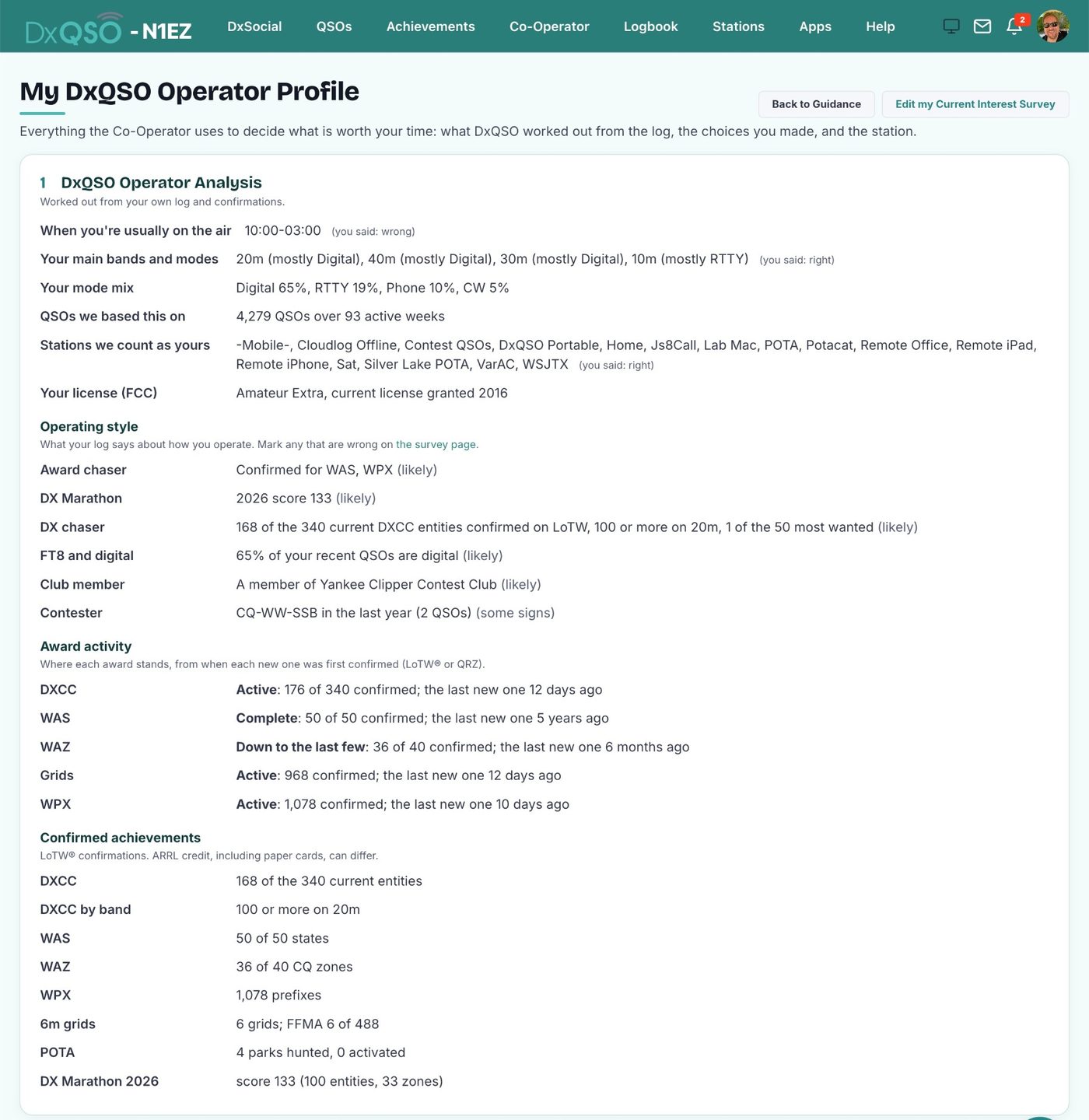
Your log is the starting point. From your QSOs and your LoTW® and QRZ confirmations, the Co-Operator knows which DXCC entities, states, zones and grids you have confirmed on which bands and in which modes, and so exactly what you still need. It also sees how you operate: the bands and modes you use, the hours you're usually on the air, the parks you've hunted or activated, the awards you've earned and the contests and Field Days you've taken part in.
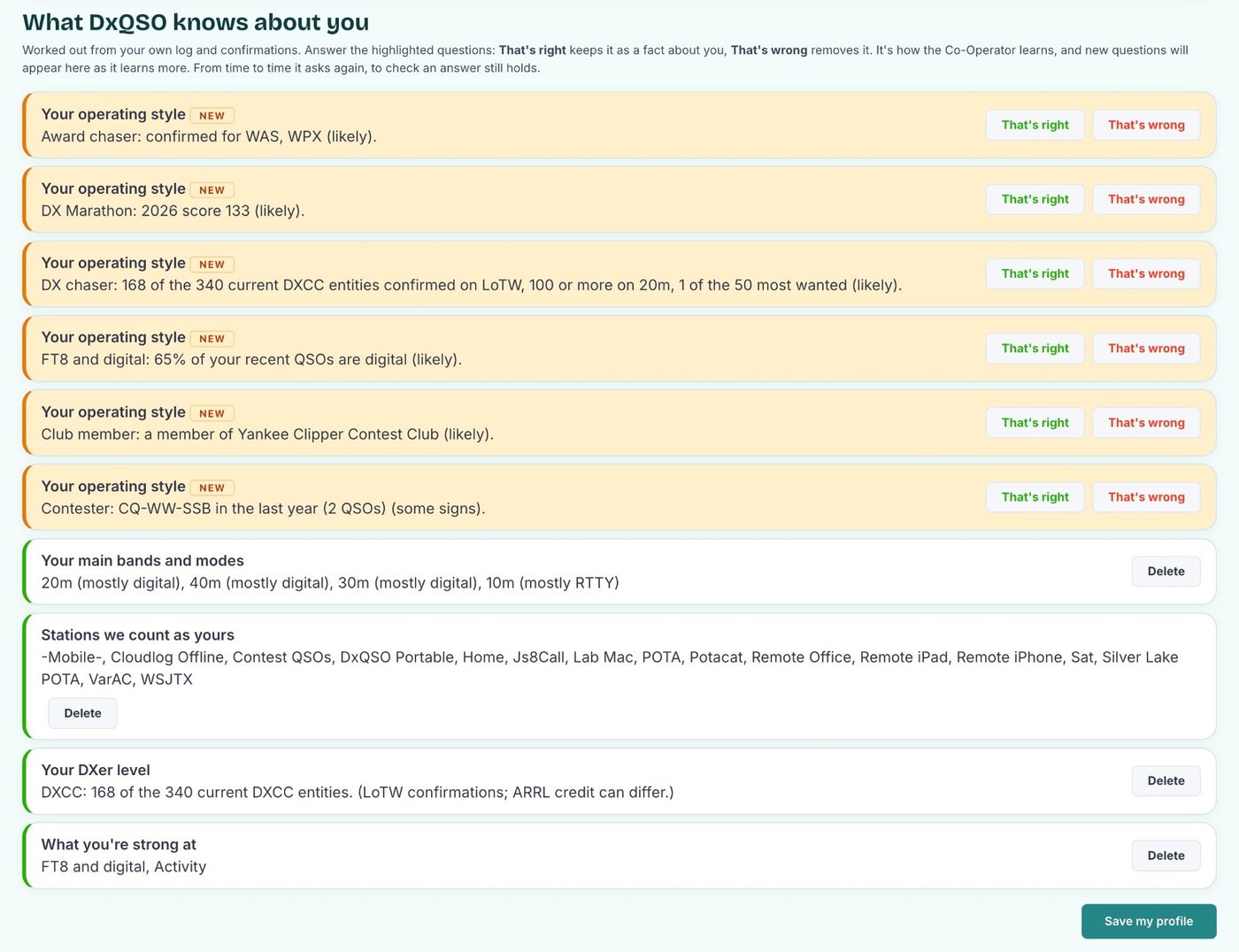
From that it recognizes the kind of operator you are, whether that's a DX chaser, an award chaser, a POTA hunter or activator, a grid hunter, a contester, a 6 m and VHF operator, a CW or FT8 operator, a DX Marathon entrant or a club member. Most of us are several at once. You can see what it has concluded on your Operator Profile, and tell it That's right or That's wrong under "What DxQSO knows about you" on My Ham Profile.
2. Your Current Interest Survey
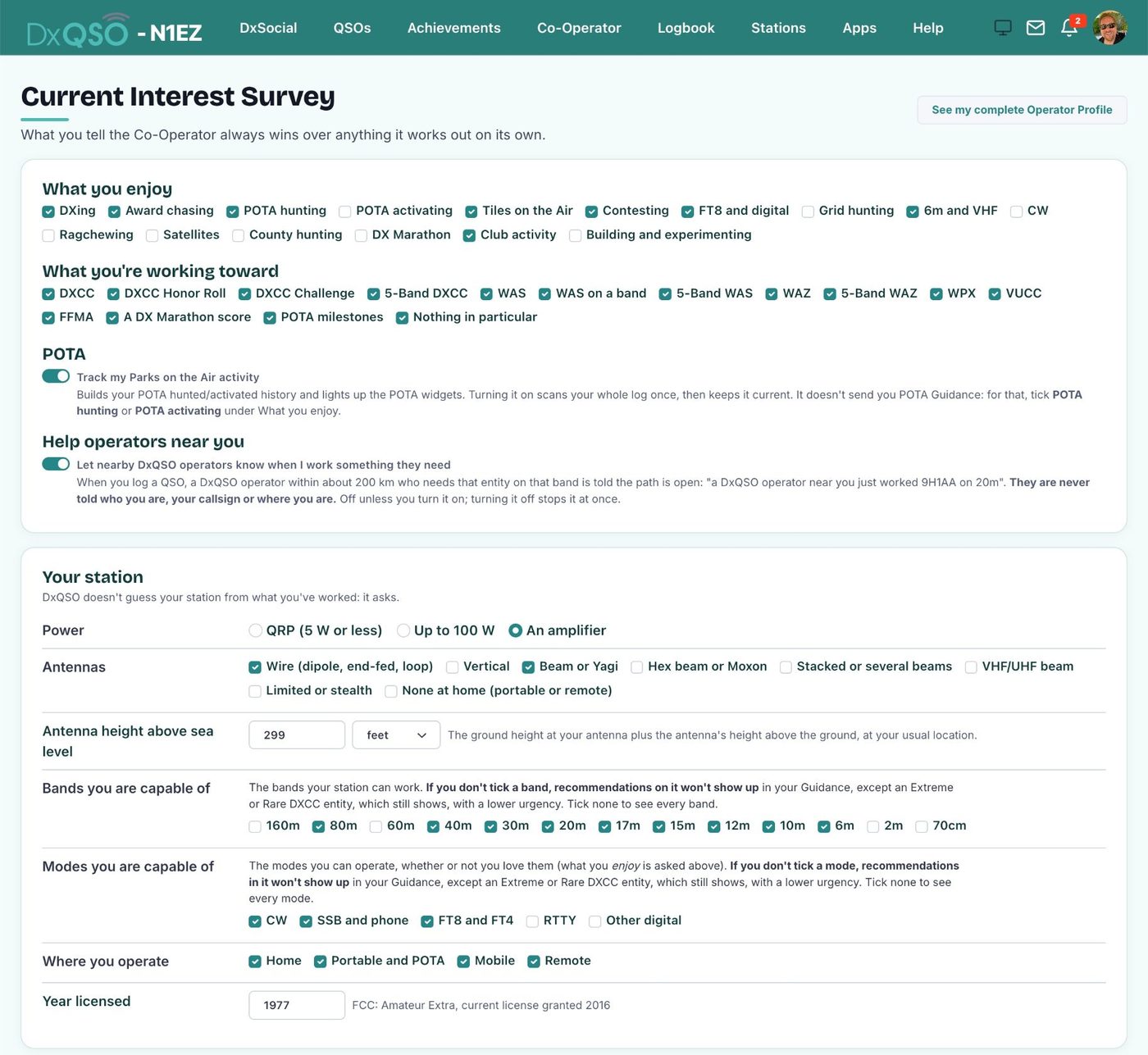
Your log shows what you've done; the survey tells the Co-Operator what you want. On My Ham Profile, the Current Interest Survey asks a handful of quick questions:
- what you enjoy: DXing, award chasing, POTA hunting or activating, Tiles on the Air, contesting, grid hunting, 6 m and VHF, DX Marathon, club activity and more
- which awards you're working toward, from DXCC and Honor Roll to WAS, WAZ, WPX, VUCC and FFMA
- the bands and modes you actually use
- your power, your antennas and where you operate from
What you tick in the survey outranks what the Co-Operator guesses from your log. Leave CW unticked and CW finds drop down your list. POTA finds wait until you tick POTA hunting or activating. It takes a couple of minutes, and it's the single best thing you can do on day one.
3. What you do
When you work a station the Co-Operator pointed you to, it notices on its own. That's the strongest "yes" there is, and nobody has to tap anything.
4. Your ratings
This is the part only you can supply: 👍 more of this, 👎 not this, thanks. More on that below.
The right news, at the right time, on the right channel
Here's what makes the Co-Operator different from a cluster window. Every find gets an urgency score from 1 to 100, built for you: how rare it is, how much it helps your awards, whether it fits your bands, modes and interests, and whether it's likely to be workable from where you are. A rare entity you need on a band you use scores high. A fifth QSO with a country you've confirmed everywhere doesn't.
Then you decide what reaches you, and how. On Alert Settings:
- Which kinds of alert you want, and on which channel: in the DxQSO app, by email, or both. Text messages are coming.
- When each channel may reach you: business hours, evenings and weekends, waking hours, any time, or hours suggested from your log so alerts arrive when you're usually able to get on the air.
- How urgent something must be for each channel, and a daily limit. You might keep the app for the most urgent finds, for example, and let email carry the rest.
- Pause, for a trip, a contest weekend or a quiet week.
Everything else is kept in Guidance, the full list of what the Co-Operator found for you, for whenever you want to look. The result is information targeted at you specifically, arriving when you want it, on the channel you chose. You stop checking; the bands come to you.
Information about what you need, when you want it, where you want it. That's the Co-Operator.
One Co-Operator, many ways to use it
Because it works from your log and your survey, the Co-Operator looks after very different operators in very different ways.
DX chasers
An entity you need, on a band or in a mode you need, spotted from your part of the world: that's On Air Now. Now or Never catches a rare one that turns up outside your usual hours. DXpeditions tells you when one you need is about to start or is on the air. And Rare Chances is for the ones you may not be offered again for years, such as an entity that's almost never heard or one of your last few. It can even tell you when a pileup is just getting started, or starting to cool off.
Award hunters
Whether it's WAS, WAZ, DXCC, 5-Band DXCC, VUCC or a DX Marathon score, the Co-Operator knows what each award still needs from you. Award Assistance tells you when you're one away, or when a confirmation completes an award. Awards and Milestones tells you when you've just qualified for an ARRL award or endorsement, and how to claim it.
POTA hunters and activators
Tick POTA in your survey and Parks on the Air tells you when a park you need is being activated, including parks that would give you a new state or entity, and it can tell you when an activator is about to go QRT. If Tiles on the Air is one of your interests, Tiles on the Air covers those activators too.
The bands from where you are
Not chasing anything in particular? The Co-Operator still keeps you in touch with the bands, based on what's actually been heard from your area. Today's Best Window is a morning note on the band and time that usually carries entities you need. Your Window Just Opened tells you when that band opens. Season Opening catches 10, 12, 15 or 6 m coming alive after a quiet month, Greyline looks at your sunset and sunrise, and Contests points out a contest this week where entities you need were on the air last year. Your Week on the Air, the weekly digest, pulls it all together.
Your club and your friends
Ham radio is better with friends. Friends on the Air tells you when a fellow club member just worked something you need, or when a club member or someone you follow on DxSocial is activating a park. Your Club follows your club's members on the air, your live event score, and the moment a clubmate is about to pass you on the leaderboard.
Why rating matters
Two operators with the same log can still want very different things. One is chasing the last few entities for Honor Roll and doesn't care about another contact with Japan. The other has just started on 6 m and wants every new grid. The log and the survey get the Co-Operator most of the way. Your ratings take it the rest of the way.
Ratings work through the urgency score. A 👍 raises the urgency of future finds about the same callsign, the same entity, or that entity on that band or in that mode. A 👎 lowers it. Since each channel only sends what's urgent enough for it, a few ratings move finds above or below the line: the ones you care about start reaching your phone, and the ones you don't quietly stay in Guidance. A 👎 goes further and stops alerts about that subject altogether.
Fewer alerts you don't want, more of the ones you do. That's what a rating buys you.
Two kinds of rating
Each Guidance card can be rated in two ways.
👍 and 👎 on what the card is about
Every card is about a callsign, a DXCC entity, a band and a mode, and you can rate each of them on its own:
- 👍 means "more like this." Future finds about the same callsign, the same entity, or that entity on that band or in that mode get a higher urgency score, so they're more likely to reach you as an alert.
- 👎 means "not this." It lowers the score, and it also stops alerts about it:
- a callsign for six months
- an entity, or that entity on that band, or that entity in that mode, until you remove the rating
A 👎 on the band or the mode is about that entity, not the band everywhere. A 👎 on "Japan on 20 m" stops alerts for Japan on 20 m; it doesn't touch 20 m for anything else.
Changed your mind? Tap the same 👎 again, or give the card a 👍, and the block is lifted.
"Was this alert useful?"
Under each card is one more question. For an alert you were sent it reads "Was this alert useful?"; for something the Co-Operator found but didn't send, "Would this have been worth an alert?" Answer Useful or Not useful.
This rates the alert as a whole: was it worth interrupting you for? To be clear about where we are, it doesn't change what you receive on its own today. It's the record the next generation of the Co-Operator learns from, so it can tell which kinds of alert are worth sending you and which you'd rather see only in Guidance. Every answer you give now makes that learning better.
How to rate on dxqso.net
- Sign in at dxqso.net and choose Co-Operator → Guidance.
- Each card shows its callsign, entity, band and mode across the top, with 👍 and 👎 under each one. Click to rate. It's saved at once.
- A 👎 asks you to confirm, and tells you exactly what it will stop.
- Under the card's text, click Useful or Not useful.
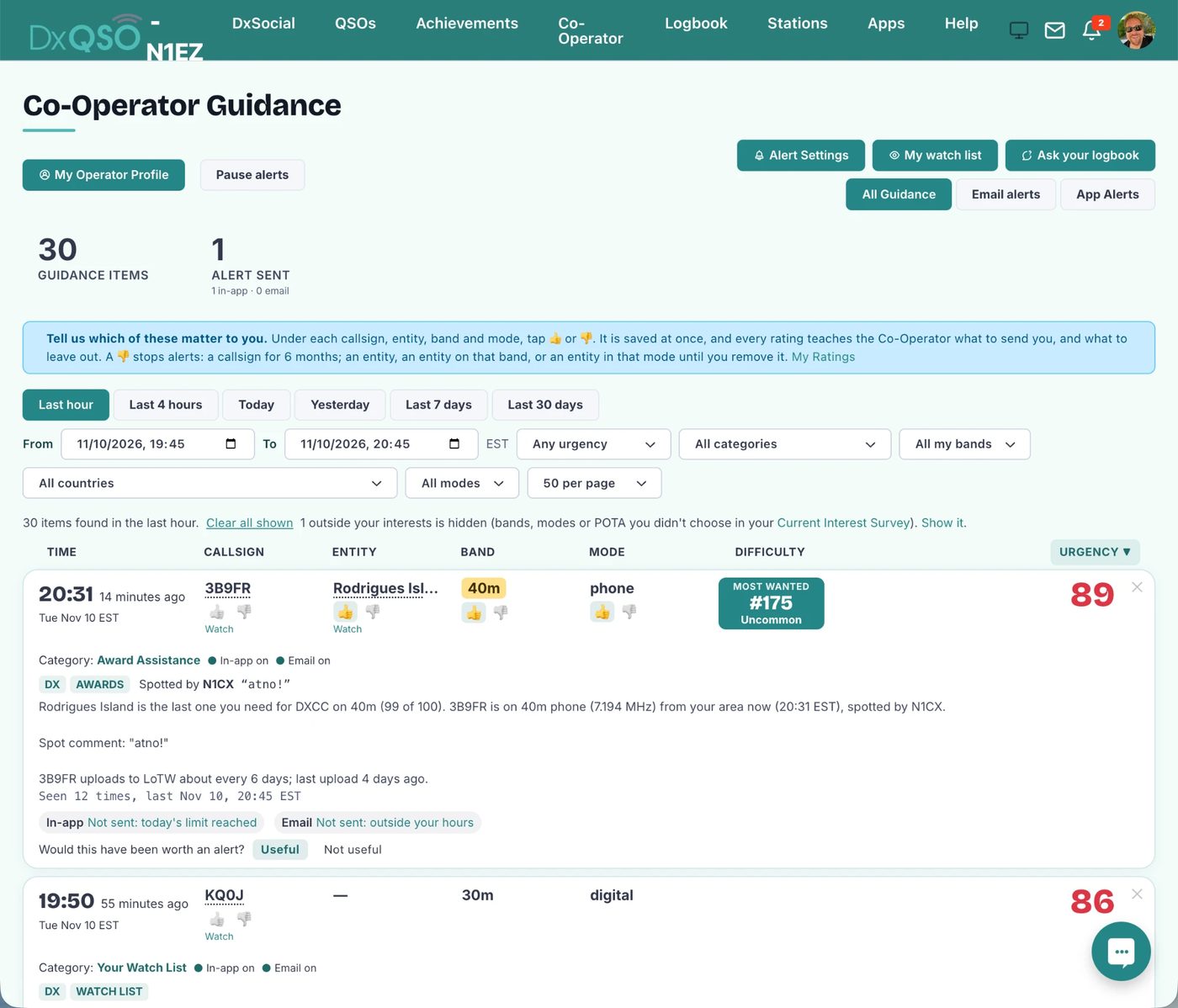
The ✕ in the corner of a card is different: it just clears that card off your list. It blocks nothing.
How to rate in the DxQSO app
- Open the Guidance or Alerts tab.
- Swipe a card to the right. You'll see 👍 Rate 👎, and the rating sheet opens.
- Tap 👍 or 👎 beside Callsign, DXCC, Band and Mode. A 👎 asks you to confirm before it stops anything.
- Answer Useful or Not useful, then tap Done.
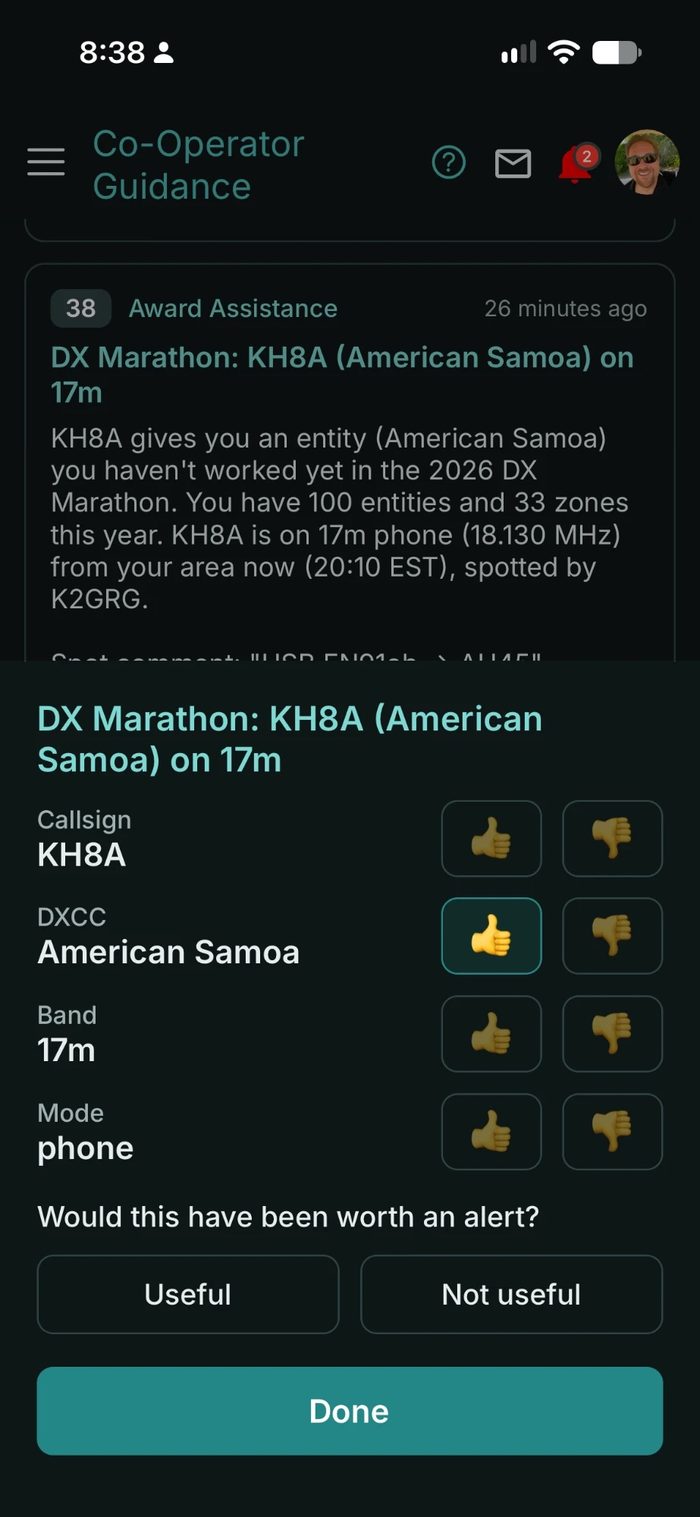
Swiping a card to the left dismisses it, the same as ✕ on the web. If you don't see swipe-to-rate, update to the latest version of the DxQSO app.
Seeing and changing your ratings
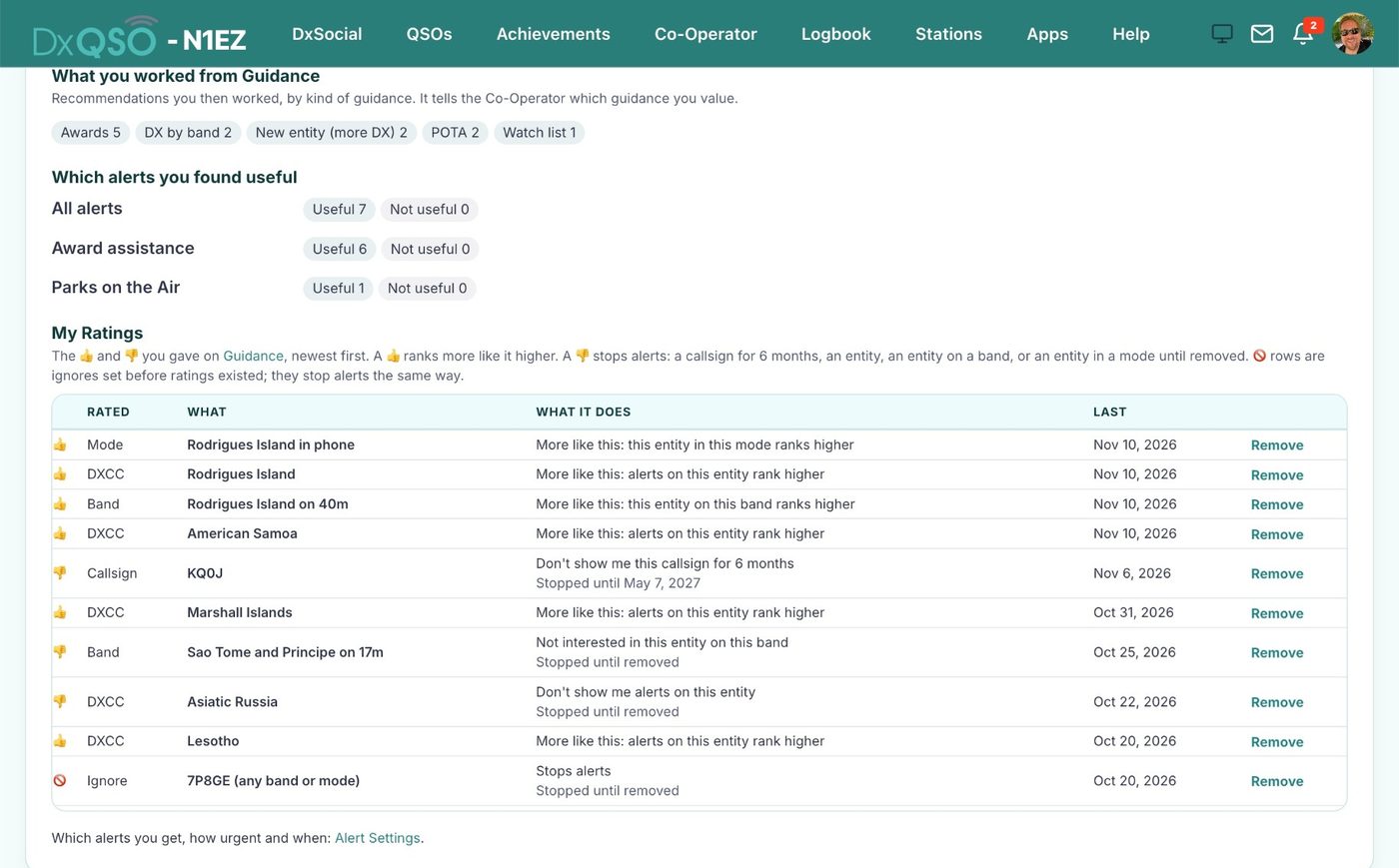
Every 👍 and 👎 you've given is listed under My Ratings on your Operator Profile, newest first. Remove one there and it stops counting, and any block it made is lifted. Your Operator Profile also shows how many alerts you've called useful and not useful, by kind of alert.
A few good habits
- Fill in the Current Interest Survey first. It's the quickest way to point the Co-Operator in the right direction.
- Rate the ones you didn't want. A 👎 on a station you'll never chase is the quickest way to quiet down your alerts.
- Rate the good ones too. A 👍 lifts more like it toward your phone.
- Answer Useful or Not useful even when you're busy. One tap now pays off in what the next generation sends you.
- Look at Guidance now and then, not just the alerts. "Would this have been worth an alert?" on something it didn't send is just as valuable.
Common questions
Will a 👎 stop everything from that country? Only if you 👎 the entity. A 👎 on the callsign stops that one station for six months; a 👎 on the band or mode stops that entity only on that band or in that mode.
Can I undo a rating? Yes. Tap it again, give the card a 👍, or remove it under My Ratings on your Operator Profile.
Does "Not useful" stop that kind of alert? Not on its own today. Use a 👎 to stop something now; "Not useful" is the record that teaches the Co-Operator over time. To turn a whole kind of alert off, use Alert Settings.
What's the difference between 👎 and ✕? A 👎 stops alerts like that one. ✕ (or a swipe left in the app) just clears that one card off your list and blocks nothing.
Do I have to change how I log? No. Keep using N3FJP, Log4OM, N1MM+, HRD, WSJT-X, MacLoggerDX or whatever you run today. The Co-Operator works from the log DxQSO already keeps for you.
Who can use it? The Co-Operator is part of DxQSO Membership. You rate your own Guidance.
The Co-Operator gets better the more you tell it. Fill in your survey, open Guidance, give a few cards a 👍 or 👎, and let us know what you think, right there on the card or here.
73, Steve, N1EZ
LoTW® is a registered trademark of the American Radio Relay League. QRZ and QRZ.com are trademarks of QRZ, LLC. DxQSO is not affiliated with or endorsed by the ARRL or QRZ, LLC.