Two-Way QRZ Sync — Keep Your QRZ Logbook, Add the Alerts
Jun 14, 2025 · Steve Berry, N1EZ
QRZ.com is where an enormous part of our community keeps its logbook, checks confirmations, and chases awards. So when people ask me whether DxQSO is going to replace QRZ, the answer is an emphatic no. QRZ is a terrific logbook, and a lot of you are perfectly happy there. DxQSO’s job is not to move you off it — it is to connect it to everything else and put the results in your pocket. Today that connection gets a major upgrade: full two-way QRZ sync.
Both directions, automatically
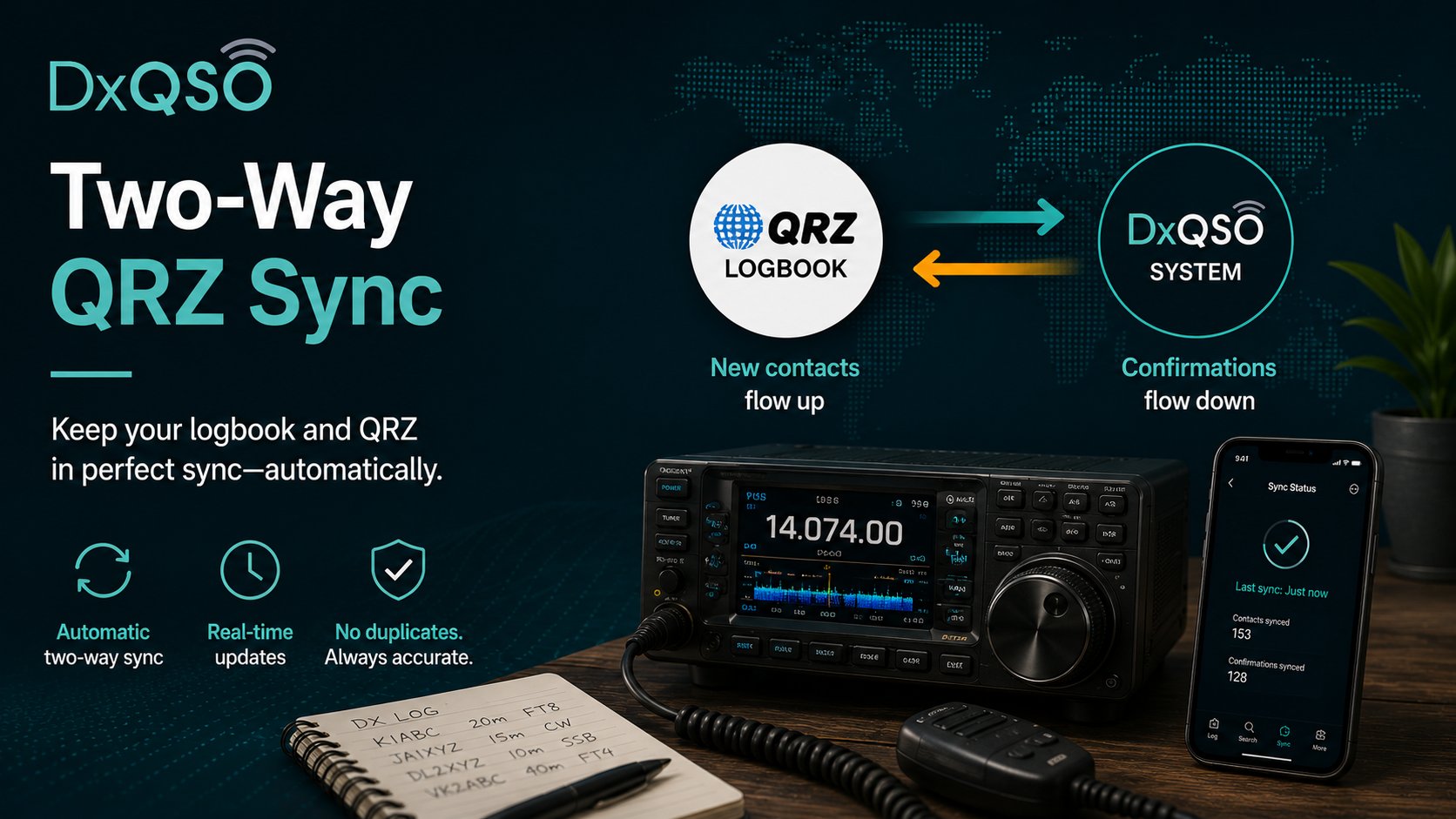
Two-way sync means new contacts flow up to QRZ.com as you make them, and confirmations flow back down into DxQSO as they happen. When a contact you worked becomes a confirmed QSL on QRZ, you do not find out the next time you remember to log in and look. It is already reflected in your one living record — and, if you want, your phone or your email inbox tells you the moment it happens.
That last part is the heart of it. Confirmations are the payoff of this hobby, and for years the only way to collect that payoff was to go check. Check LoTW. Check QRZ. Check the cluster. DxQSO is built on the opposite idea: the good news should come to you. Two-way QRZ sync is what makes that true for the millions of contacts that live on QRZ.
What “two-way” actually buys you
Plenty of tools can do half of this — push a log up to QRZ, or pull a report down. The value is in closing the loop so you never touch either direction by hand. Make a contact in your usual logging program, and it can be on QRZ without a manual upload step. Later, when the other operator confirms, that confirmed QSL comes back into DxQSO automatically and keeps your record current. You are not exporting, importing, or reconciling two copies of the truth. There is one record, and it stays current in both directions on its own.
It is also duplicate-aware, which is what makes it safe to just leave on. If the same contact reaches DxQSO from more than one place — your QRZ account and a home-shack export, say — the system reconciles it instead of creating a mess. You should never have to think about the plumbing. You make contacts; the record keeps itself straight.
One record, your logbooks intact
Pairing QRZ sync with our existing LoTW® connection means DxQSO now keeps both of the big confirmation systems aligned with a single, always-current operating record — without asking you to change a thing about how you log. Work a station, and the contact can be on its way to QRZ and LoTW at once. Earn a confirmation on either, and it lands in the same place, on every device you own, and it tells you it arrived.
This is true and valuable whether you run ten logbooks or exactly one. If QRZ is your whole world, DxQSO simply makes it mobile, current, and quietly automatic, and starts alerting you to the things you used to have to hunt for. If you operate across a contest logger, a POTA app, and a home-shack program, QRZ becomes one more source that folds cleanly into the same record alongside the rest.
What it looks like for award chasers
If you are working toward DXCC, WAS, VUCC, or any of the QRZ awards, the difference is not subtle. Your progress toward each one stops being something you audit by hand every few weeks and becomes something DxQSO tracks continuously. The moment a confirmation crosses a line — a new entity, the last state you needed on a band, a fresh grid — that is exactly the kind of thing worth a buzz on your phone. The confirmation you have been waiting months for should not sit unnoticed in a report you forgot to open. It should find you.
Why we keep building bridges
I want to be precise about what we are doing here, because it is the core of the entire DxQSO idea. We did not build another logbook. We built the connective tissue between the logbooks you already trust and the things that make them worth keeping — the confirmations, the achievements, the people you operate with. Two-way QRZ sync is one more bridge in that picture, and it is a big one.
Connect your QRZ account, switch it on, and let your confirmations start finding you. If you are a club that runs its logging through QRZ, this one is especially worth a look — because once your activity is flowing into DxQSO, the collaboration features we are building on top of it have something real to work with. More on that soon.